Stay Up To Date
We believe in keeping you in the loop with all the latest happenings in our courses and system. On this page, you'll find a comprehensive log of all the exciting changes, improvements, and additions we make to our courses and system. Whether it's a new feature, a course enhancement, or a system update, we've got you covered. Bookmark this page and check back regularly. We're committed to ensuring that your learning experience remains exceptional and that you have all the information you need to succeed.

New Features

New Updates

Resources & Tools

Important Updates
Here are some of the most recent updates we thought would be helpful to take note of

New Feature: Facebook Post Sync in Social Planner
Keeping your Facebook recent posts and their performance insights updated inside the CRM will give you a complete view of your social activity. The Facebook Post Sync feature will make light work of it. Let's learn how to use it!
⭐️How To Enable Facebook Post Sync In The Social Planner?
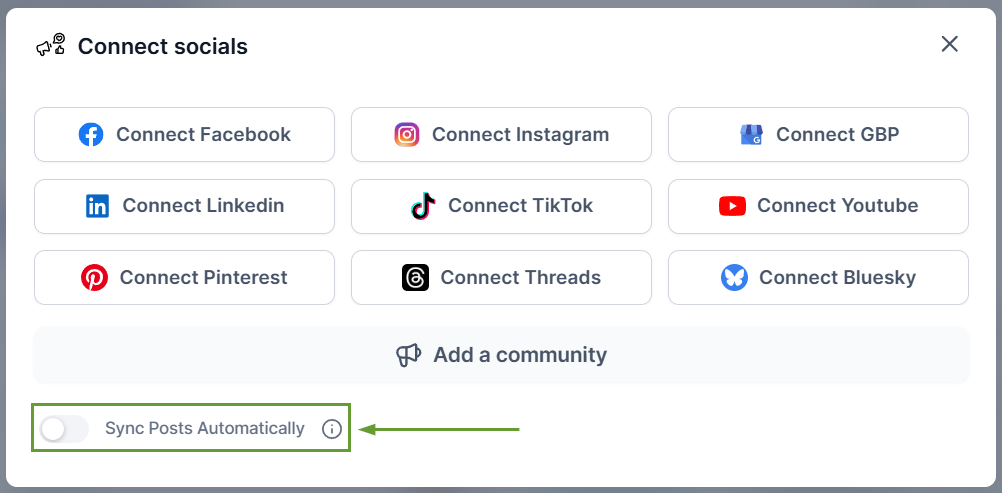
Head to the Social Planner tab in the Marketing section and click + Socials to connect a new account.

Toggle the Sync Posts Automatically option on when connecting your Facebook account
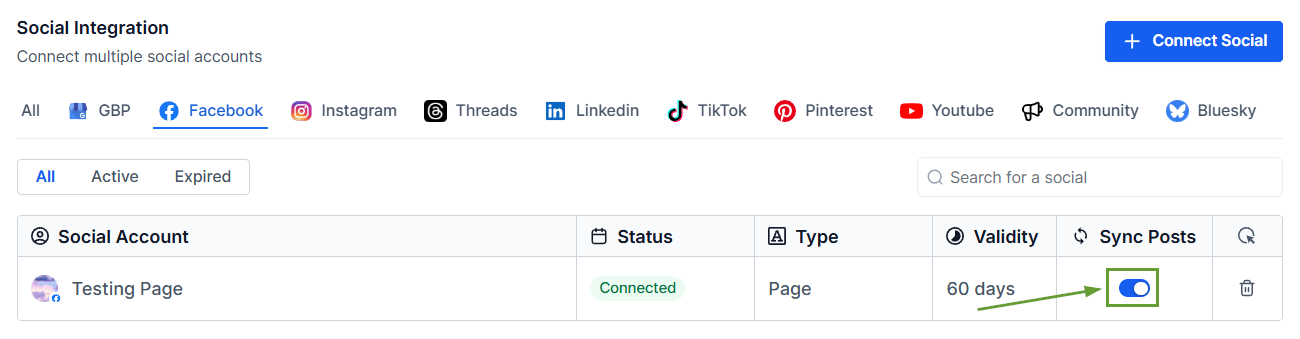
Alternatively, if your account is already connected, open the settings by clicking the gear icon.

Locate your Facebook account and enable Post Sync.
⭐️Why Is This Feature Beneficial To Your Company?
Facebook Post Control: Centralize Facebook content inside Social Planner by fetching Facebook posts from the last 30 days and doing background syncs with this feature.
Simplified Post History: Access past posts without manually recreating them. Synced posts include the post text, images, videos, and basic post analytics.
Improved Reporting: Posts are synced with their original publish date, allowing accurate historical reporting alongside scheduled content insights.
Facebook Post Sync automatically imports your existing Facebook posts into the Social Planner, making it easy for you to manage all your social activity in one place. We hope you enjoy it!
